
 Aminah Zaheer

When it comes to packaging design, creating a dieline from scratch can take a lot of time. That’s why free dieline templates are a great starting point for many designers. They save time, reduce mistakes, and make it easier to test ideas before investing in a custom design. Whether you are a beginner or an experienced packaging designer, using dieline templates can help you speed up the design process while ensuring accuracy.
In this blog, we’ll explore what dieline templates are, why they matter, and where you can find some of the best free dieline templates for different packaging styles.
What Are Dieline Templates?
A dieline template is a pre-made layout that shows the flat outline of a packaging design. It includes cut lines, fold lines, glue tabs, and safety margins. Designers use these templates in software like Adobe Illustrator or CorelDRAW to create a packaging design that will fit perfectly when folded and printed.
Instead of drawing each dieline manually, templates allow designers to work faster and more confidently. For example, if you are designing a custom box, you can start with a template that already has the basic structure and simply add your branding, colors, and artwork.
Free Dieline Templates
Here are some of the most common types of packaging dieline templates:
Free Mailer Box Dieline Templates for Shipping
Mailer boxes are widely used for online shopping and subscription packaging. They are sturdy and easy to assemble, making them a favorite choice for shipping.
Free Sleeve Box Dieline Templates for Luxury Packaging
Sleeve boxes add a simple sliding cover over another box. They are often used to make plain packaging look more stylish and premium.
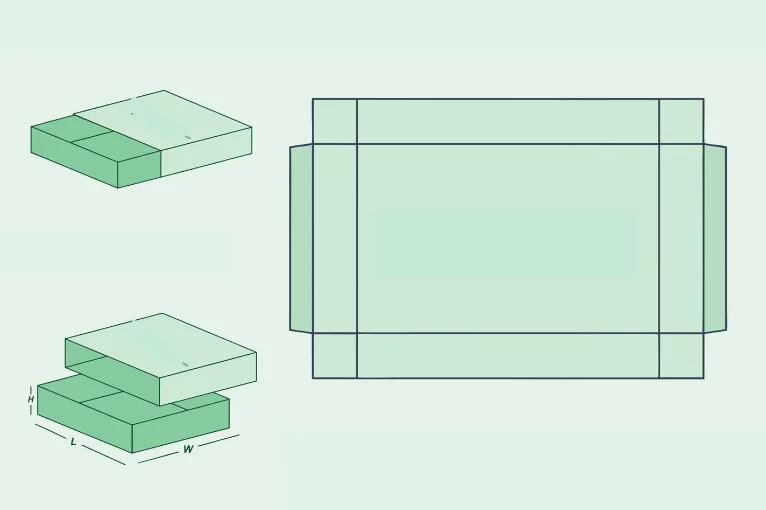
Free Display Box Dieline Templates for Retail
Display boxes are made for showcasing products in retail stores. They help attract customer attention at the counter or point of sale.
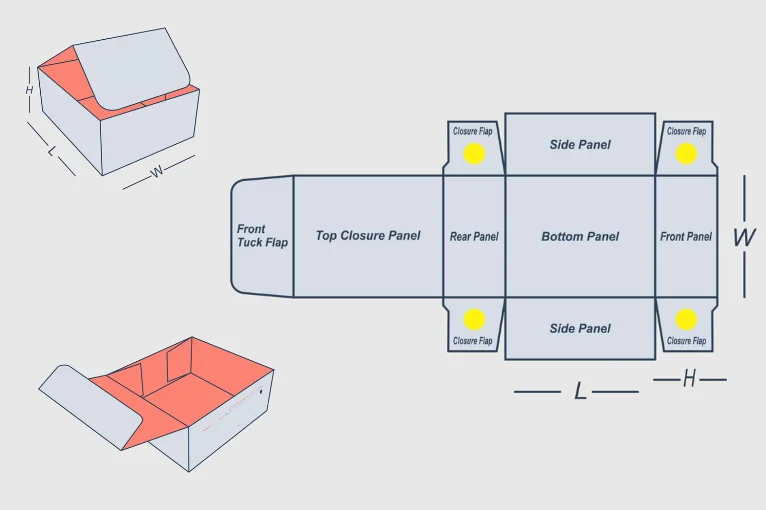
Free Pillow Box Dieline Download Templates
Pillow boxes have a soft curved shape and are often used for gifts, accessories, or small items. They are simple yet elegant.
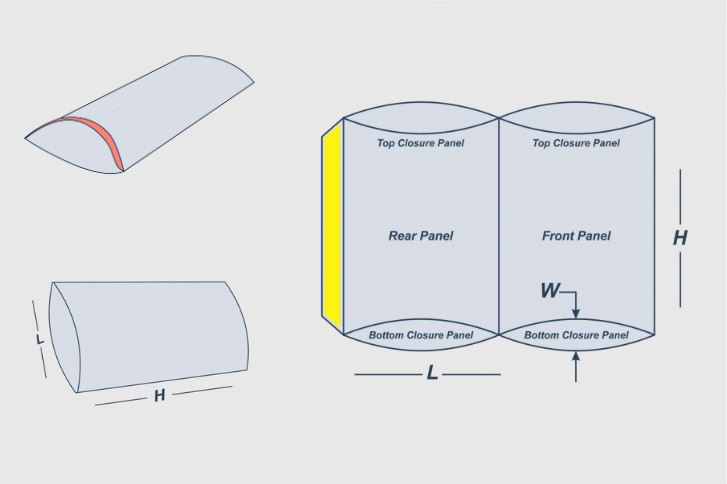
Free Luxury Box Templates & Two Piece Dielines
Two piece boxes come with a separate base and lid. This design is often chosen for luxury packaging and high end products.
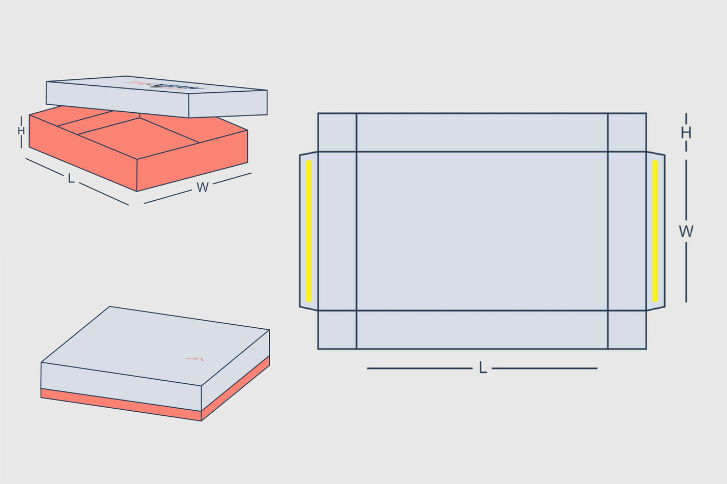
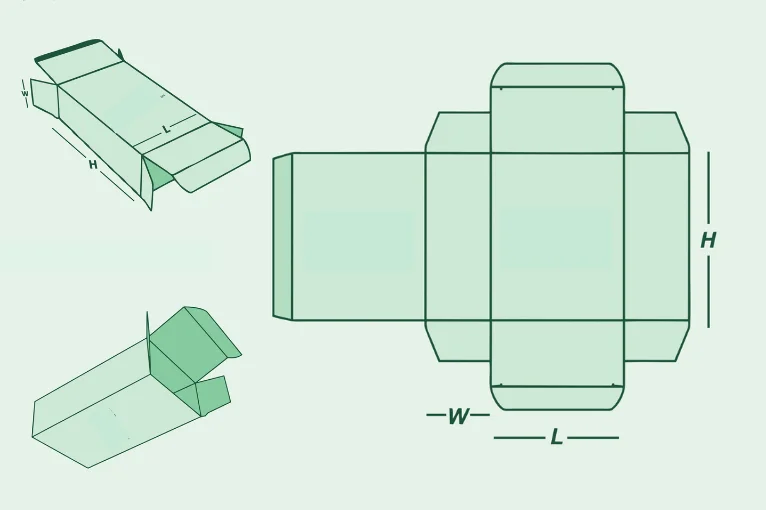
Free Tuck Box Dieline Templates for Retail Packaging
Tuck boxes close with folding flaps on the top or bottom. They are lightweight, practical, and very common for retail packaging.
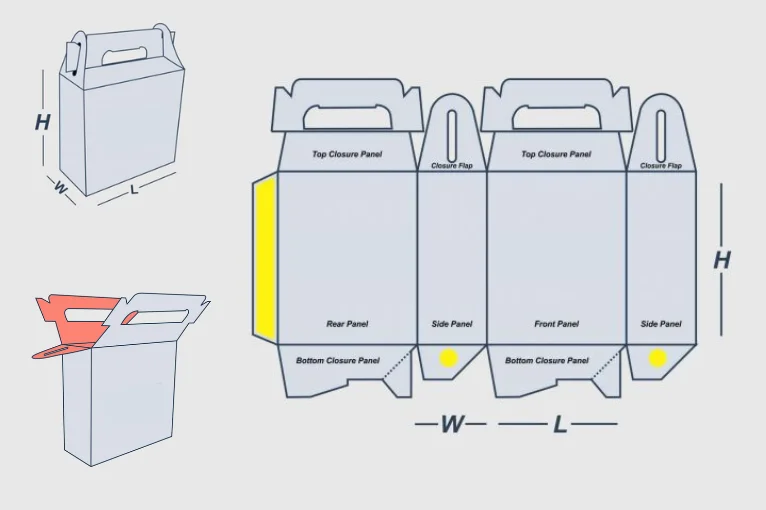
Free Gable Box Dieline Template Download
Gable boxes have a unique shape with a handle on top. They are popular for food items, party favors, and takeaway packaging.
Where to Find Free Dieline Templates
There are many websites where packaging designers can download free dieline templates. Some of the most useful options include:
Template.net
This site offers a wide variety of free and paid dieline templates. Files are usually available in formats like AI and PDF, making them easy to edit.
Packmage
Packmage is known for its interactive dieline software. It also provides free templates that can be customized for different packaging styles.
Diecuttemplates.com
This website focuses on free box templates. It is a good choice for anyone looking for simple and practical packaging designs.
Packaging of the World
Along with design inspiration, this platform occasionally shares free dieline templates for creative and unique projects.
Graphic Design Communities
Websites like Behance, Dribbble, and Freepik often feature designers who share free dieline resources for others to download and use.
Free Dieline Generators vs. Templates: Which Should You Choose?
What's the Difference Between Templates and Generators?
While dieline templates provide pre-made flat layouts, free dieline generators are interactive tools that create custom dielines based on your specifications. Here's how they compare:
Dieline Templates:
- Pre-designed, ready-to-use layouts
- Best for: Matching standard box sizes
- File formats: AI, PDF, CDR (editable or flat)
- Cost: Free to $50+
- Time to use: 5-30 minutes
- Customization: Limited to the design template provided
Dieline Generators:
-
Software that builds dielines from your measurements
-
Best for: Custom dimensions outside standard sizes
-
Output: Usually PDF or export-ready files
-
Cost: Many are free with limited features; paid versions $50-500+
-
Time to use: 10-45 minutes (includes measurement input)
-
Customization: Highly customizable to your exact specs
Best 3 Free Dieline Generator Options:
1. Packmage (Freemium Model)
- Offers basic free tier for simple boxes
- Generates dielines based on entered dimensions
- Good for: Quick mailer box designs
- Limitation: Advanced shapes require paid plan
2. Template.net's Dieline Generator
- Free tool with limited exports
- Drag-and-drop interface
- Good for: Beginners who want visual control
- Limitation: Basic shapes only
3. Boxify (Emerging Tool)
- Free online dieline creator
- 3D preview feature
- Good for: Visualizing how your design will fold
- Limitation: Limited export formats
Use Templates when:
- You need a standard box size (mailer, pillow, gable, etc.)
- You want to start immediately without learning software
- You prefer editable files (AI format) for design flexibility
Use Generators when:
-
Your box dimensions are non-standard
- You need precise custom specifications
- You want a 3D preview before printing
- You're designing multiple box variations
How to Use Free Dieline Templates
Using a free dieline template is easy when you follow a few simple steps:
- Download the Template
Select the template in a format that works with your design software such as AI, PDF, or CDR. - Open in Illustrator or CorelDRAW
Import the template and keep it on a separate layer so it stays clean and organized. - Add Your Artwork
Place your branding, colors, images, and product details onto the design. - Check for Bleed and Safety Margins
Make sure all important design elements are inside the safe zone with enough bleed for printing. - Export for Printing
Save your final design in CMYK format and include bleed settings so it is ready for production.
Tips for Choosing the Right Free Template
Keep these points in mind when selecting a free dieline template:
- Match the Product
Choose a template that matches the exact size and shape of your product to avoid fitting issues later. - Check Printer Requirements
Some printers accept only certain file formats, so confirm their needs before starting your design. - Look for Editable Files
Templates in formats like AI or EPS are much easier to adjust compared to flat PDF files. - Focus on Quality
Even if the template is free, it should have precise measurements and professional accuracy.
Advantages of Free Dieline Templates for Businesses
For businesses, dieline templates can be a cost-effective way to test packaging ideas before investing in custom designs. Small startups can save both time and money by using free resources. Plus, templates make it easier to share packaging ideas with clients, manufacturers, or investors without needing advanced design skills.
Final Thoughts
Free dieline templates are a smart solution for packaging designers who want to save time, reduce errors, and learn the basics of structural packaging design. From folding cartons to mailer boxes and display units, there are many options available for different industries. However, while free resources are useful, nothing beats a custom dieline that is made to fit your exact product and brand needs.
At HT Custom Boxes, we help businesses create professional custom dielines and high-quality packaging solutions. Whether you need folding cartons, mailer boxes, or luxury packaging, our experts ensure your packaging design is not only print-ready but also aligned with your brand identity.
 Phone
Phone